
gnoMint
A GTK 4 Certification Authority manager
View the Project on GitHub davefx/gnoMint
- Source code
davefx/gnoMint on GitHub - Latest release
1.6.8 "Tempered Anvil" (2026-06-20) — changelog - License
GPL-3.0-or-later
gnoMint
Certification Authority management made easy.
A graphical Certification Authority manager for the Linux desktop, with a matching readline CLI for scripting and CI.
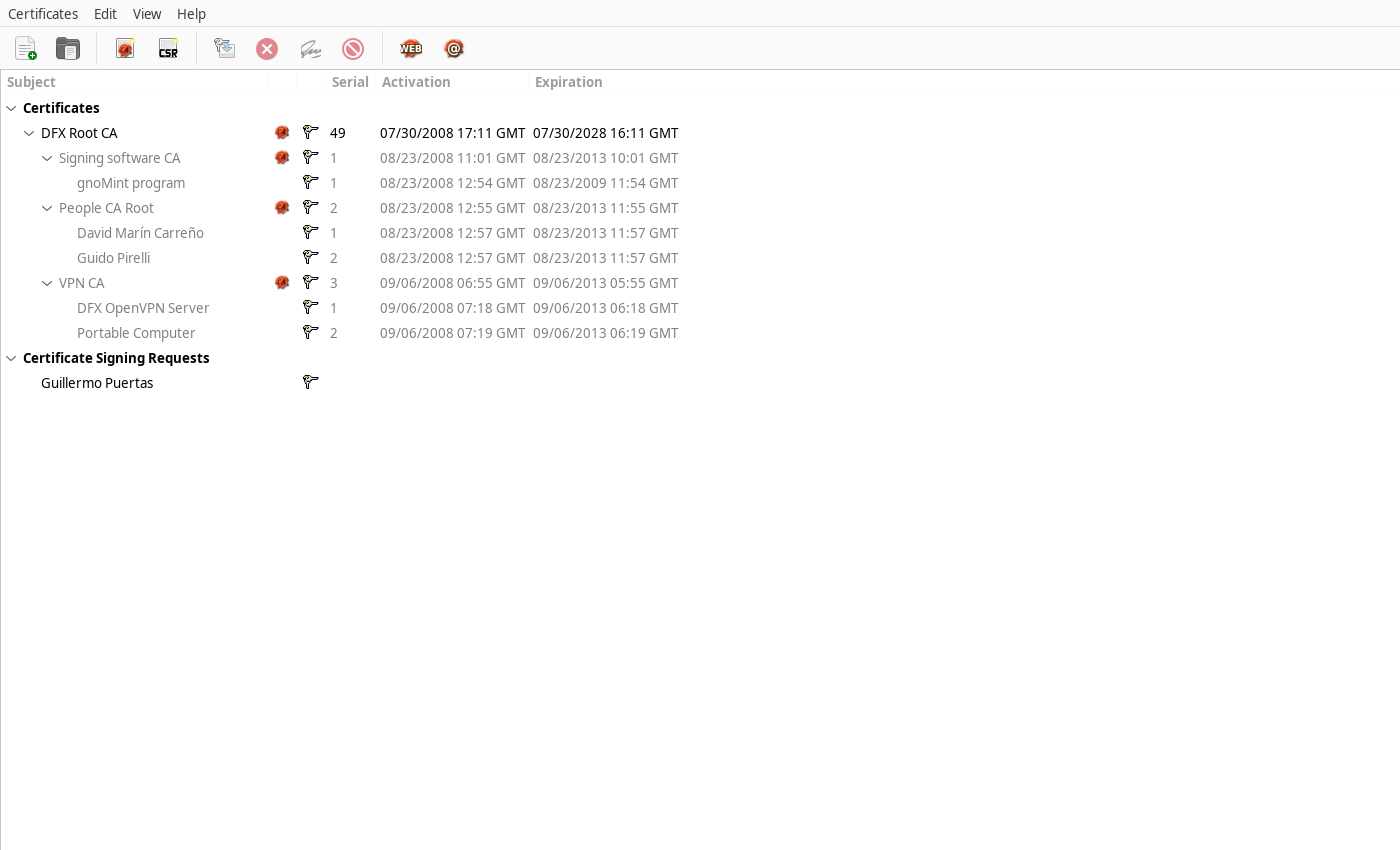
gnoMint is a GTK 4 application (with a parallel gnomint-cli readline
front-end) that lets you bootstrap a Certificate Authority, issue and
revoke certificates, manage CSRs, publish CRLs, and import/export keys
and PKCS#12 bundles — all stored in a self-contained SQLite database
file you can carry around or back up like any other document.
At a glance
| CA databases | One *.gnomint SQLite file per organisation; full hierarchical CAs |
| Key algorithms | RSA, DSA, ECDSA (P-256/P-384/P-521), Ed25519 |
| Standards | X.509, PKCS#8, PKCS#10 CSRs, PKCS#12 bundles, X.509 CRLs |
| Extensions | Subject Alternative Names (SAN), Extended Key Usage, Basic Constraints |
| Interfaces | GTK 4 desktop GUI and gnomint-cli readline shell |
| Workflows | New CA, sign CSR, revoke, renew, bulk-revoke, full-chain export |
| Lifetime safety | 64-bit time_t everywhere — Y2K38-safe certificates |
Why gnoMint?
- It’s a desktop app, not a script. Discoverable workflows, a real tree view of your hierarchy, and a property dialog for every cert.
- One file per CA database. Nothing leaks into your home directory; back up a single SQLite file and you have everything.
- Wizards for the most common cases — web-server certs and email certs — so you don’t have to remember which extensions to flip.
- Two front-ends, one source tree. Use the GUI on your laptop and the CLI in your CI pipeline; they read the same database.
Frequently asked questions
What is gnoMint?
gnoMint is a free, open-source graphical X.509 Certificate Authority (CA)
manager for the Linux desktop. It also ships a Windows installer and a
matching gnomint-cli command-line interface. You use it to create and run
your own Certificate Authority — issuing, signing, revoking and exporting
certificates — without hand-editing OpenSSL configuration files.
Is gnoMint free? Yes. gnoMint is free and open-source software, released under the GNU General Public License version 3 or later (GPL-3.0-or-later).
Which operating systems does gnoMint run on?
Linux is the primary platform (GTK 4 desktop app). There is a Windows
installer (MSI), and the gnomint-cli command-line tool runs anywhere the
project builds. It is written in C on top of GTK 4, GnuTLS and SQLite.
Which key algorithms and standards does gnoMint support? Keys: RSA, DSA, ECDSA (NIST P-256, P-384 and P-521) and Ed25519. Standards: X.509 certificates, PKCS#10 signing requests, PKCS#8 keys, PKCS#12 bundles, X.509 CRLs, Subject and Issuer Alternative Names, and Extended Key Usage.
How does gnoMint store certificates and keys?
Everything for one organisation lives in a single self-contained SQLite
file (a *.gnomint database) — all CAs, certificates, requests, keys and
revocation state — so you can back it up or move it like any other document.
How is gnoMint different from the OpenSSL command line?
gnoMint gives you a graphical (and scriptable CLI) front-end over a
persistent CA database, with a tree view of your hierarchy, wizards for
common certificate types, and per-CA policies — instead of remembering
openssl flags and maintaining openssl.cnf files by hand. It is a
desktop-oriented alternative to tools such as XCA or tinyCA.
Source code
gnoMint is developed in the open on GitHub — github.com/davefx/gnoMint.
- Browse the source — the full C code tree
- Latest release & downloads — tarballs and the Windows installer
- Report a bug — issue tracker
- Send a patch — pull requests welcome
git clone https://github.com/davefx/gnoMint.git
Quick links
- Features overview — what gnoMint can do
- Install guide — packages and building from source
- User manual — task-oriented walkthrough
- Tutorial — set up a CA for a small firm + OpenVPN
- Release history — every release since 2006