
gnoMint
A GTK 4 Certification Authority manager
View the Project on GitHub davefx/gnoMint
- Source code
davefx/gnoMint on GitHub - Latest release
1.6.8 "Tempered Anvil" (2026-06-20) — changelog - License
GPL-3.0-or-later
Features
gnoMint covers the full lifecycle of a small-to-medium Certificate Authority: bootstrap a root, sign certificates and CSRs, revoke them, publish CRLs, and export anything as PEM or PKCS#12. The 1.4.0 release (“Lazarus”, May 2026) brought it back from a decade-long hiatus with a modernised codebase, a test suite, and a batch of new conveniences.
Why gnoMint exists. From the original 2006 announcement: “Its development was started due to the lack of a ‘just-works’ CA software: creating a CA from zero, through open-source command-line utilities, was possible, but was uncomfortable. You had to remember all the necessary parameters and create a difficult configuration file. So here is gnoMint, to help system and network administrators deploy a Certification Authority very easily.” Two decades on, that’s still what gnoMint is for.
Certificate Authority management
- Hierarchical CAs. Build a root CA, sign intermediate CAs under it, and sign leaf certificates under those. The hierarchy is rendered as a tree view; every column is sortable.
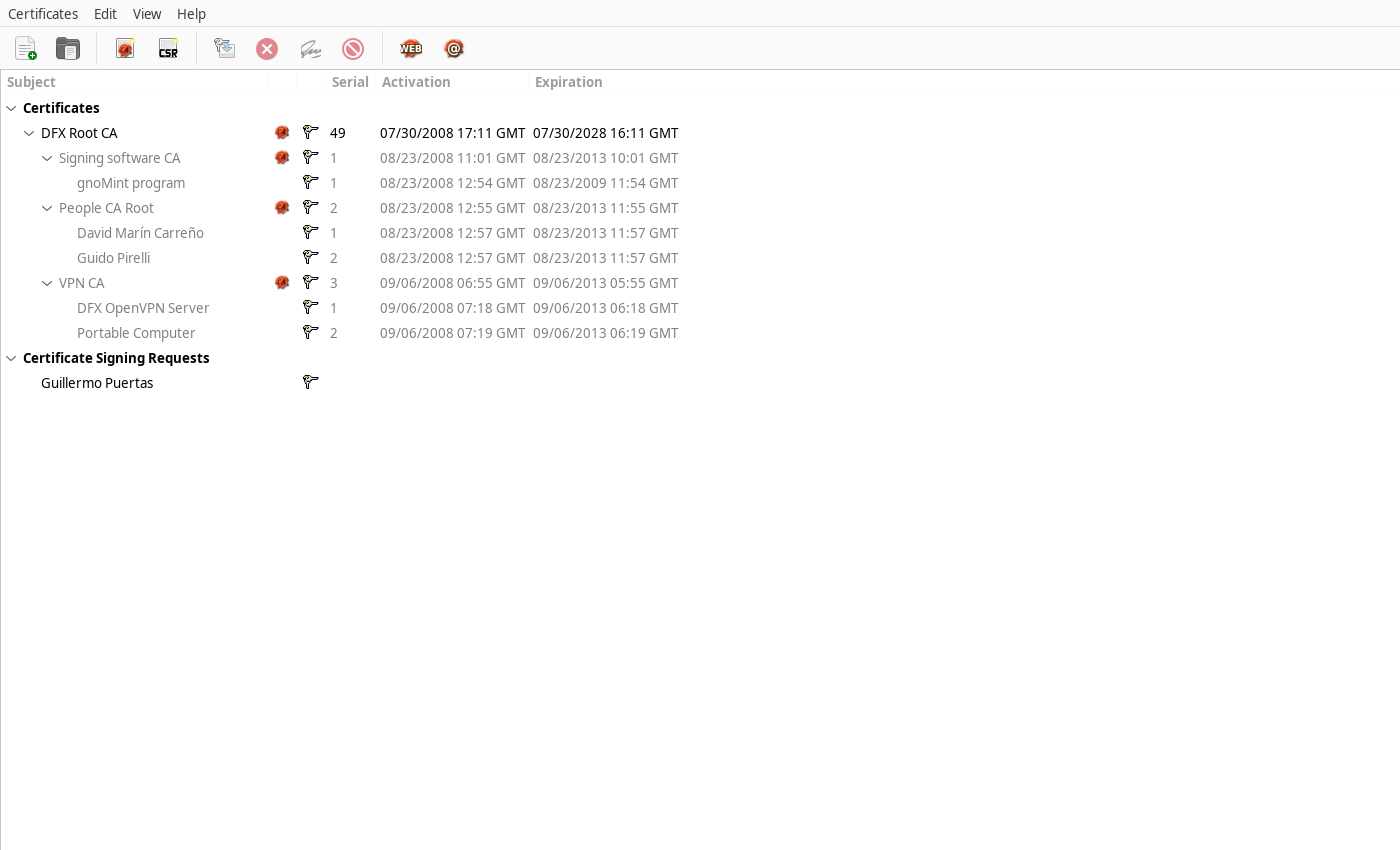
- Per-CA policies. Default key length, expiration period and signing policy are stored on each CA, so creating subordinate certs uses sane defaults without you re-typing them.
- Self-contained
.gnomintfiles. A CA database is a single SQLite file you can copy, symlink, back up, or version-control.
Key algorithms
| Algorithm | Notes |
|---|---|
| RSA | Default. Key length configurable per CA. |
| DSA | Legacy, included for compatibility. |
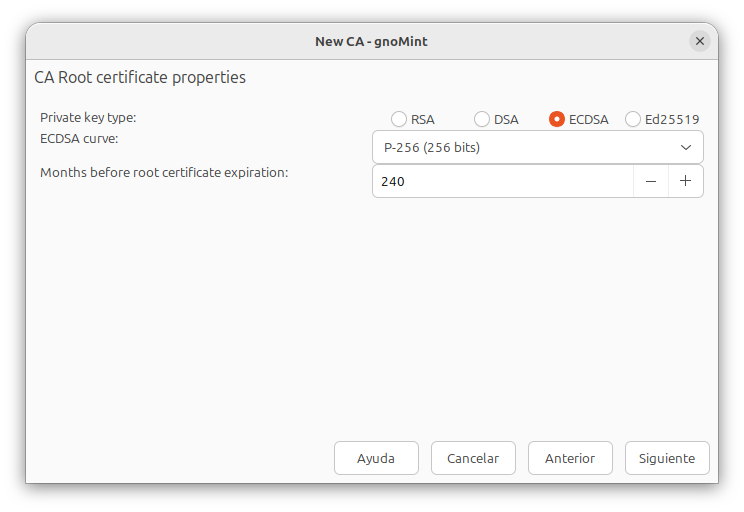
| ECDSA | NIST prime curves: P-256, P-384, P-521. |
| Ed25519 | Modern, fixed-size, fast signatures. |
ECDSA and Ed25519 support landed in 1.4.0 and is available from both the New-CA and New-CSR dialogs.
Certificate workflows
Sign a CSR
Import a PKCS#10 CSR, pick a signing CA, optionally edit the SAN list, choose validity and key usage — gnoMint emits the certificate, stores it in the CA database, and lets you export it as PEM, DER, or part of a PKCS#12 bundle.
Wizards (issue #15)
- Web server certificate wizard. One screen: enter the hostname, pick a CA, done. SANs, key usage, extended key usage and the rest are set automatically.
- Email certificate wizard. Same, but for S/MIME — email address, CN, key-usage profile set for signing + key encipherment.
Subject Alternative Names
SANs are first-class. The SAN editor is available when creating a CA, when generating a CSR, and when signing one. DNS names, IP addresses, email addresses, and URIs are all supported and round-trip cleanly through the property dialogs.
Bulk operations (issue #54)
Select multiple certificates with Ctrl-click or Shift-click and:
- bulk-revoke them in one shot, or
- bulk-delete CSRs in one shot.
Non-cert / non-CSR ids in the selection are silently skipped, so it’s safe to leave a mixed selection.
Full-chain export (issue #52)
Right-click any leaf cert and choose Export full certificate chain. You get a single PEM bundle in web-server order — leaf first, root last — ready to drop into Apache, nginx, HAProxy, etc.
Renewal (in progress for the next release)
Take an existing cert and re-issue it with a fresh validity period, keeping subject, SAN, extensions and key.
Expiry warnings
Per-row colouring (issue #51)
The tree view colours rows by their effective expiration:
- Amber if the certificate expires within the configured warning window (default 30 days; configurable in preferences).
- Red if it has already expired.
- Grey if it’s expired and “show expired” is on, so you can see history without misreading it.
Expiry is computed cascade-style: a certificate is effectively
expired at the earliest of its own notAfter and every ancestor CA’s
notAfter. A perfectly-valid leaf under an expired CA is shown as
expired — because that’s what relying parties will see (RFC 5280).
Hide expired
A “Show expired certificates” toggle in the View menu (persisted in GSettings) lets you collapse expired branches out of the tree.
Y2K38 safety
Certificate validity periods routinely run 10, 20 or 30 years out, well
past the 2038 wraparound point for 32-bit time_t. gnoMint relies on the
platform’s native 64-bit time_t: it sets _FILE_OFFSET_BITS=64 but
deliberately does not force _TIME_BITS=64, a glibc ABI switch that
must match every linked library — forcing it only in gnoMint corrupted
the GnuTLS ABI on i386 (issue #86). A conditional compile-time assertion
in src/time64_check.h verifies sizeof(time_t) == 8 wherever 64-bit
time_t is the ABI, and a standalone test_y2k38 harness exercises the
logic. On any platform with a 64-bit time_t you can confidently issue
50-year certificates; on legacy 32-bit-time_t platforms such as i386,
gnoMint warns and clamps a new certificate’s expiry to the 2038 limit
while still displaying post-2038 dates already stored in a database.
CLI
Every workflow available in the GUI is available from gnomint-cli, a
readline shell with command completion. Useful when scripting:
gnomint-cli ~/ca.gnomint
gnomint> addca
gnomint> addservercert --hostname=example.com
gnomint> revokecert 42
gnomint> exportchain 7 /tmp/example.com.fullchain.pem
The CLI uses the same SQLite database as the GUI, so you can mix and match.
Internationalisation
gnoMint ships translations for Catalan, Czech, German, Spanish, Finnish, French, Italian, Occitan, Brazilian Portuguese, Russian, Slovak and Swedish. PRs adding or improving locales are very welcome.
Test suite
make check runs:
- a Y2K38 unit test,
- a static
.uiconsistency check (catches GtkBuilder layout files that fail to load, GtkGrid cell collisions, and orphan signal handlers), - a Wayland-backed workflow regression suite (new-CA, sign-CSR, revoke, extract-private-key, wizard) with critical-log capture so any GTK warning fails the build,
- and CLI smoke tests for email- and wizard-driven cert issuance.
See tests/README for running the suite locally.